Wedding Planning Checklist: Download Free Excel
October 6, 2026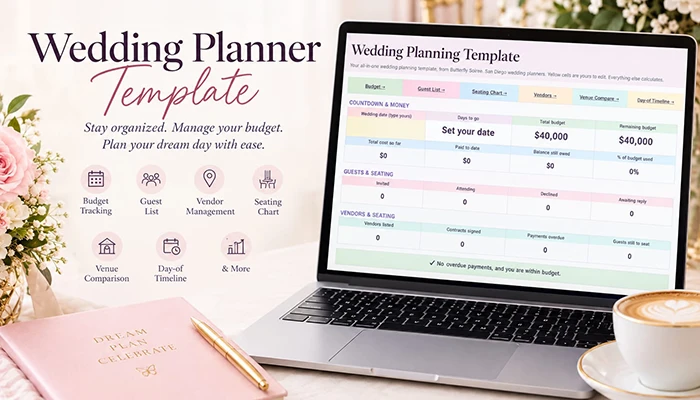
The Short Answer
A good wedding planning template is a working file, not a list. It tracks your budget, vendor payments, guest list and RSVPs, seating, venue options and wedding-day schedule in one place, and the parts talk to each other. Ours is a free Excel workbook with eight linked tabs. Add a vendor contract and your budget updates. Mark an RSVP and your headcount and meal counts change. Set your ceremony time and the day-of schedule rebuilds itself.
Most couples start planning with a notes app and a vague plan to "get organized later." By month three there's a budget in one place, vendor emails in another, and a guest list that exists in at least two versions. We built this workbook so everything lives in a single file and the numbers keep each other honest.
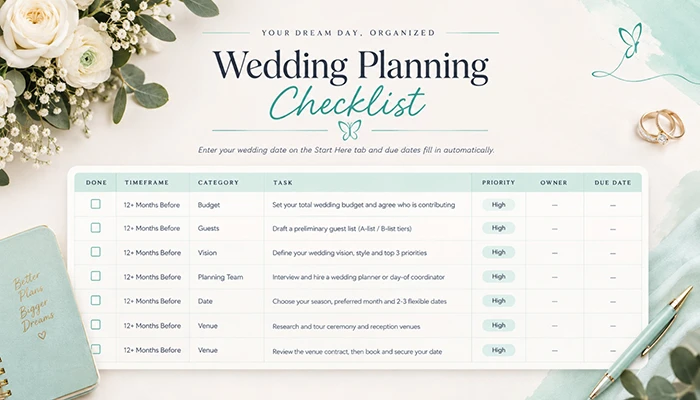
It's the companion to our wedding planning checklist. The checklist tells you what to do and when. This template is where you keep track of it: the money, the people, the contracts and the schedule. You can use either one alone, but they work best together.
What's inside the wedding planning template
|
Tab |
What it does |
Reach for it when |
|
Dashboard |
Countdown, budget, RSVP and payment snapshot, with two charts |
You want the whole picture at a glance |
|
Budget |
Splits your total across 14 categories and tracks costs against it |
You're setting the budget, or a quote just came in |
|
Vendors |
Contacts, contract totals, payments and balance due dates |
You book anyone, or pay anyone |
|
Guest List |
250 rows with RSVP, meal choice, party size and thank-you tracking |
Invitations go out, replies come back |
|
Seating Chart |
20 tables with up to 12 seats each and duplicate warnings |
RSVPs are closed and it's time to seat people |
|
Venue Compare |
Weighted scoring for up to four venues |
You're down to a shortlist |
|
Day-of Timeline |
A schedule that shifts when you change the ceremony time |
You're building the wedding-day flow |
|
Lists |
Editable meal choices and guest groups for the dropdowns |
You want different meal options or categories |
Colors: Yellow cells are yours to edit. White cells calculate on their own. The grey italic example rows show the format and don't count toward any total, so delete them or write over them.
Dashboard: your wedding on one screen
Type your wedding date into the first yellow card and the countdown starts. Below it you'll see your total budget, what you've committed, what you've paid and what you still owe, plus invited, attending, declined and awaiting-reply guest counts.
A banner near the middle turns red if a vendor payment is overdue or you've gone over budget, and stays green when nothing needs attention. Underneath, a chart compares budget with actual cost by category, a second shows RSVP status, and a small table gives you the meal counts your caterer will ask for.
Planner tip Open the dashboard once a week and treat it as a five-minute meeting with yourself. Couples who check in regularly catch overdue deposits and budget drift while they're still easy to fix.
Budget tab: from total to category amounts
Enter your total budget and the sheet divides it into 14 categories using starting percentages. Those percentages are a launch point, not a benchmark. If photography is your priority, push it up and trim the categories you care less about. A warning appears if your percentages don't add up to 100%.
|
Category |
Starting % |
What usually belongs here |
|
Venue & Rentals |
18% |
Site fee, tables, chairs, linens, tent or lounge rentals |
|
Catering & Bar |
25% |
Food, beverages, bar staff, cake-cutting fees |
|
Photography & Video |
12% |
Photographer, videographer, albums |
|
Planner / Coordinator |
8% |
Planning or day-of coordination fees |
|
Florals & Decor |
10% |
Ceremony and reception flowers, lighting, signage |
|
Music & Entertainment |
7% |
DJ, band, ceremony musicians, photo booth |
|
Attire, Rings & Beauty |
8% |
Dress, suit or tux, alterations, rings, hair and makeup |
|
Stationery & Postage |
2% |
Save-the-dates, invitations, programs, stamps |
|
Cake & Desserts |
2% |
Wedding cake, dessert table |
|
Transportation |
2% |
Shuttles, car service, parking |
|
Ceremony |
1% |
Officiant, marriage license fee |
|
Favors, Gifts & Misc. |
1% |
Wedding party gifts, favors, welcome bags |
|
Taxes, Fees & Gratuity |
2% |
Sales tax, service charges, tips |
|
Contingency Buffer |
2% |
The surprise you didn't see coming |
Why a line for taxes, fees and gratuity? In the U.S., many venue and catering quotes list a per-person price and then add a service charge and sales tax at the end. That line catches what the headline number leaves out. If your quotes are already all-in, you can reduce it.
If you're not sure what your total should be, start with our guide on how to budget for a wedding. For a real-world reference at a specific guest count, see what a 100-person wedding costs.
Vendors tab: contracts, payments and due dates
This is the tab that makes the budget work. For each vendor, enter the contact details, pick a budget category from the dropdown, then add the contract total and what you've paid so far. The sheet calculates the balance and labels each row:
- Paid in full (green)
- On track
- Due within 30 days (yellow)
- OVERDUE (red)
The Budget tab picks up every contract total by category, so you never enter the same number twice. Fifteen common vendor types are already listed, and you can add more below them.
A quick example of how the pieces connect: You sign a photographer for $4,200 and pay a $1,500 deposit. Enter 4,200 as the total and 1,500 as paid. The balance shows $2,700. Photography & Video on the Budget tab now shows $4,200 committed against its allocation, and your dashboard's "balance still owed" rises by $2,700.
Before you sign with any vendor, ask:
- What is included in this price, and what costs extra?
- What is the payment schedule and the cancellation policy?
- Is there a travel fee, overtime rate or service charge?
- Who exactly will be working my event?
- What happens if you're ill or unavailable on my date?
Not sure whether a quote is reasonable? Our breakdown of wedding photographer costs in San Diego shows what packages typically include and where the extras tend to hide
Guest list tab: RSVPs, meals and thank-yous
Each guest gets a row. Fill in their name, side, group and party size, then track whether you've sent the save-the-date and the invitation. When replies arrive, choose Yes, No or Pending. The top of the sheet updates your totals and response rate as you go.
A few habits keep this tab accurate:
- List each guest on their own row when meal choices differ. Use Party Size only for households that share a single entree choice.
- Collect mailing addresses early. The column is there for a reason. Chasing addresses in the month before invitations go out is nobody's favorite task.
- Log gifts as they arrive. A column for the gift and one for the thank-you means you won't wonder three months later who sent what.
- Keep an A-list and a B-list in mind and add B-list guests only once declines come in.
Meal choice dropdowns come from the Lists tab, so you can swap "Beef" for "Short rib" or add a children's option. The dashboard totals each meal for you, with a separate count for guests who haven't chosen yet. Caterers usually want those numbers by a specific deadline, so keep an eye on it.
Planner tip Set your RSVP deadline three to four weeks before the wedding, but ask guests to reply a week earlier than you tell your caterer. That gap is your cushion for the stragglers.
Seating chart tab: seat people once the RSVPs are in
Twenty tables are set up with room for up to 12 seats each. Capacity is editable per table. Click a seat to pick a guest from your list, or type a name. If the same name appears twice, both cells turn red. Each table shows whether it's full, over capacity or still has seats open, and the top of the sheet shows how many attending guests still need a place.
Some guidelines worth following:
- Wait until your RSVP deadline has passed before building the chart in earnest. Seats you assign too early just get moved.
- Seat guests who don't know anyone near a friendly table, not in a corner.
- Think about access: grandparents near restrooms, guests who use mobility aids on a clear path, and families with small children near an exit.
- Don't keep a table of "leftover" guests. Mix them in where they'll be welcome
Venue comparison tab: score your finalists
When you've toured a few venues and the quotes start to blur, this tab helps you decide with something besides gut feeling. Enter up to four venues, then fill in the facts: fee, food and beverage minimum, service charge, estimated all-in quote, capacity, and whether outside caterers and weather backup are allowed.
Then score each venue from 1 to 5 on eleven criteria, from look and feel to staff quality. Set a weight for each one to reflect what matters to you. The sheet produces a weighted score out of five, ranks the venues and names a top pick. Cells turn green for the winner.
The weights are the part that changes outcomes. A couple who cares most about food will weight catering flexibility at a 5. A couple marrying outdoors will weight weather backup the same way. Whichever way you lean, the sheet makes you say so out loud.
What to weigh depends on the setting:
- At a beach venue, wind, permits and guest comfort can matter more than anything else.
- At an outdoor venue, power, restrooms and a backup plan carry a lot of weight.
- A garden venue often comes with strict rules about decor, vendors and sound.
- In the city, our guide to downtown San Diego wedding venues covers parking, elevators and load-in logistics worth scoring.
Still building your shortlist? Start with our guide to wedding venues in San Diego, and check what venues cost in San Diego so your quotes make sense side by side.
Torn between two venues? Send us both quotes and your date, and we'll tell you what each one leaves out before you sign. Use the consultation form at the bottom of this page and mention your shortlist.
Day-of timeline tab: a schedule that moves with your ceremony
Type your ceremony start time, and the whole day fills in around it: hair and makeup, first look, portraits, ceremony, cocktail hour, dinner, toasts, first dance, cake cutting and send-off. The sample timing assumes a 4:00 PM ceremony and a reception of about five hours, but the "minutes from ceremony" column is editable. Change a number and the clock time recalculates.
Each row has a place for who's responsible, where it happens and a checkbox. Share the finished timeline with your photographer, DJ, caterer and wedding party so everyone is working from the same schedule.
Two things to build the day around:
- Sunset time. Look it up for your date and schedule portraits so you're outside with good light, not rushing at the end.
- Buffer minutes. Weddings run behind. Add ten or fifteen minutes before your most important moments and you'll rarely feel it.
Don't want to run the schedule yourself? The best timeline still needs someone to keep it moving at 4:15 p.m. when the florist is late and the flower girl needs a snack. That's what our day-of wedding coordinator service is for. You build the plan, we make it happen.
Making the template yours
The workbook starts generic, and it's meant to be bent. A few adjustments for common situations:
- Small weddings: Delete the extra seating tables and trim the budget categories you won't use. If you're still choosing a space, our guide to small wedding venues in San Diego is a good starting point.
- Multi-day weddings: Add rows to the Guest List for each event (welcome party, ceremony, reception, farewell brunch) and create a copy of the timeline tab for each day. This is particularly useful for Indian wedding venues in San Diego and celebrations with more than one event.
- Destination weddings: Add a column for travel arrangements and room blocks, and give guests more notice. If you're marrying away from home, our destination wedding planner service handles the logistics.
- California weddings: Planning legally and logistically in the state has its own steps. See how to plan a wedding in California.
To add more guests or vendors, copy the last row and paste it below. The formulas and dropdowns come with it.
Common spreadsheet mistakes (and how to avoid them)
- Typing totals instead of letting the sheet calculate them. If you overwrite a formula cell, it stops updating. Stick to the yellow cells.
- Leaving the example rows in. They don't affect your totals, but they make the sheet look cluttered. Delete them early.
- Entering a vendor without a category. If the budget category is blank, that contract won't show up in the Budget tab.
- Seating people before RSVPs are final. You'll redo it three times.
- Never saving a backup. Save a dated copy every few weeks, or keep the file in cloud storage.
When a template isn't enough
A spreadsheet can track a wedding. It can't call a vendor who hasn't answered in two weeks, negotiate a contract or notice that a venue's timeline doesn't work for your guest count. That's where planning help comes in.
|
If you're thinking... |
What fits |
|
"I want someone to handle everything, start to finish." |
|
|
"Our wedding is large, high-end or heavily designed." |
|
|
"We have the vendors. We need the look to come together." |
|
|
"We'll plan, but someone needs to run the day." |
Day-of coordination (see the timeline section above) |
Wedding planning template FAQs
Bring your workbook to us
Already filled in the Budget and Vendors tabs? Book a consultation and bring the file. We'll go through your numbers with you, point out the line items that tend to run over, and tell you which tasks are worth handing off and which you can comfortably keep.
Meet Wedding Planner

Selina Garcia
Selina Garcia is the founder and lead planner of Butterfly Soirée, a luxury wedding planning and event coordination company based in San Diego. With more than 15 years of experience, she specializes in creating elegant, thoughtfully planned weddings and memorable celebrations. Her expertise includes wedding planning, event coordination, vendor management, design direction, and seamless wedding-day execution. She takes a personalized, client-first approach to ensure every celebration reflects the couple’s vision, style, and story. She serves couples throughout San Diego, Southern California, and selected destination wedding locations.